
Monday, 30 April 2012
DSDN 142 - P2 - My new code images.
Structure to Noise. My new code using pattern maker :) (that i posted earlier) Here are some of my images showing the process from noise to structure.


DSDN 142 - P2-My codes
I want to have both codes but i cant :(
One code is using a (while)loop and the other is the pattern maker code.
This is my pattern maker code. By using this way I get to control each rectangle in my pattern and I have added a random factor (xi,yi) to it to get structure and structured noise/noise. I can do this by adding xi to the x co-ordinate of my code in rect and adding yi to the y co-ordinate of my code in rect. I can keep adding both of these to each of my rect codes and get a noise as a result.
Here is the code:
int xRepeat = 150;
int yRepeat = 150;
int x = 20;
int y = 20;
int w1 =40;
int a = 10;
int b = 10;
int bw = b+w1+b;
void setup() {
size(500, 500);
smooth();
background(255);
for (int i = 0; i < width/xRepeat; i++) {//loop 1 repeats pattern in the x direction.
for (int j = 0; j < height/yRepeat; j++) {//loop 2 repeats the entire rows vertically.
pushMatrix();//saves untransformed co-ordinates
translate(xRepeat*i, yRepeat*j);// translates the entire coordinate system (is what causes the same thing to be drawn in different places).
myPattern();
popMatrix();//reverts to the saved co-ordinate system that we created using pushMatrix()
}
}
}
void draw() {
}
void myPattern() {
float ix = random(-100,100);
float iy = random(-100,100);
rect(x+a+w1,y+a+w1,bw,bw);
rect(x,y,a,a);
rect(x+a+w1+bw+w1,y,a,a);
rect(x,y+a+w1+bw+w1,a,a);
rect(x+a+w1+bw+w1,y+a+w1+bw+w1,a,a);
rect(x+a,y+a,w1,w1);
rect(x+a+w1+bw,y+a,w1,w1);
rect(x+a,y+a+w1+bw,w1,w1);
rect(x+a+w1+bw,y+a+w1+bw,w1,w1);
rect(x+a+w1+b,y+a,w1,w1);
rect(x+a,y+a+w1+b,w1,w1);
rect(x+a+w1+b,y+a+w1+bw,w1,w1);
rect(x+a+w1+bw,y+a+w1+b,w1,w1);
}
void mousePressed(){
save("image1.jpeg");
}
And this is my (while) loop code. By using this code I can get some extreme structures and especially noise. But I don't think I'll be using this code for my final project.
Here is the code:
int xRepeat = 150;
int yRepeat = 150;
int x = 20;
int y = 20;
int w1 = 40;
int a = 10;
int b = 10;
int bw = b+w1+b;
void setup() {
size(500, 500);
smooth();
background(255);
float i = (random(1));
while(i < 10){
rect(random(500),random(500),x,x);
rect(random(500),random(500),y,y);
rect(random(500),random(500),w1,w1);
rect(random(500),random(500),a,a);
rect(random(500),random(500),b,b);
rect(random(500),random(500),bw,bw);
i = i+0.1;
}
}
void draw(){
}
void mousePressed(){
save("image 1.jpeg");
}
One code is using a (while)loop and the other is the pattern maker code.
This is my pattern maker code. By using this way I get to control each rectangle in my pattern and I have added a random factor (xi,yi) to it to get structure and structured noise/noise. I can do this by adding xi to the x co-ordinate of my code in rect and adding yi to the y co-ordinate of my code in rect. I can keep adding both of these to each of my rect codes and get a noise as a result.
Here is the code:
int xRepeat = 150;
int yRepeat = 150;
int x = 20;
int y = 20;
int w1 =40;
int a = 10;
int b = 10;
int bw = b+w1+b;
void setup() {
size(500, 500);
smooth();
background(255);
for (int i = 0; i < width/xRepeat; i++) {//loop 1 repeats pattern in the x direction.
for (int j = 0; j < height/yRepeat; j++) {//loop 2 repeats the entire rows vertically.
pushMatrix();//saves untransformed co-ordinates
translate(xRepeat*i, yRepeat*j);// translates the entire coordinate system (is what causes the same thing to be drawn in different places).
myPattern();
popMatrix();//reverts to the saved co-ordinate system that we created using pushMatrix()
}
}
}
void draw() {
}
void myPattern() {
float ix = random(-100,100);
float iy = random(-100,100);
rect(x+a+w1,y+a+w1,bw,bw);
rect(x,y,a,a);
rect(x+a+w1+bw+w1,y,a,a);
rect(x,y+a+w1+bw+w1,a,a);
rect(x+a+w1+bw+w1,y+a+w1+bw+w1,a,a);
rect(x+a,y+a,w1,w1);
rect(x+a+w1+bw,y+a,w1,w1);
rect(x+a,y+a+w1+bw,w1,w1);
rect(x+a+w1+bw,y+a+w1+bw,w1,w1);
rect(x+a+w1+b,y+a,w1,w1);
rect(x+a,y+a+w1+b,w1,w1);
rect(x+a+w1+b,y+a+w1+bw,w1,w1);
rect(x+a+w1+bw,y+a+w1+b,w1,w1);
}
void mousePressed(){
save("image1.jpeg");
}
And this is my (while) loop code. By using this code I can get some extreme structures and especially noise. But I don't think I'll be using this code for my final project.
Here is the code:
int xRepeat = 150;
int yRepeat = 150;
int x = 20;
int y = 20;
int w1 = 40;
int a = 10;
int b = 10;
int bw = b+w1+b;
void setup() {
size(500, 500);
smooth();
background(255);
float i = (random(1));
while(i < 10){
rect(random(500),random(500),x,x);
rect(random(500),random(500),y,y);
rect(random(500),random(500),w1,w1);
rect(random(500),random(500),a,a);
rect(random(500),random(500),b,b);
rect(random(500),random(500),bw,bw);
i = i+0.1;
}
}
void draw(){
}
void mousePressed(){
save("image 1.jpeg");
}
Sunday, 29 April 2012
DSDN 142 - P2-My Noise images!
Here are some of my new noise images that I've been working on!! I have experimented with the sizes of my rectangles to see how small and big I could get them and when I made my pattern/rectangles really small it looked like noise or maybe even structured noise. Some of these images remind me of tiles but all mixed up. My goal for this was to created a pattern from my last code then make all the different rectangles on my pattern to appear all of the screen, multiple times. I was trying to achieve rectangular noise which I have achieved ! But you really cant see the rectangles because they are so small and it just looks like the t.v noise.
I really like what I have done and wants me to start experimenting with color and noise/structure!
-(codes at bottom)-


int xRepeat = 150;
int yRepeat = 150;
int x = 20;
int y = 20;
int w1 =40;
int a = 10;
int b = 10;
int bw = b+w1+b;
void setup() {
size(500, 500);
smooth();
}
void draw() {
background(255);
for (int i = 0; i < width/xRepeat; i++) {
for (int j = 0; j < height/yRepeat; j++) {
pushMatrix();
translate(xRepeat*i, yRepeat*j);
myPattern();
popMatrix();
}
}
}
void myPattern() {
rect(x+a+w1, y+a+w1, bw, bw);
rect(x, y, a, a);
rect(x+a+w1+bw+w1, y, a, a);
rect(x, y+a+w1+bw+w1, a, a);
rect(x+a+w1+bw+w1, y+a+w1+bw+w1, a, a);
rect(x+a, y+a, w1, w1);
rect(x+a+w1+bw, y+a, w1, w1);
rect(x+a, y+a+w1+bw, w1, w1);
rect(x+a+w1+bw, y+a+w1+bw, w1, w1);
rect(x+a+w1+b, y+a, w1, w1);
rect(x+a, y+a+w1+b, w1, w1);
rect(x+a+w1+b, y+a+w1+bw, w1, w1);
rect(x+a+w1+bw, y+a+w1+b, w1, w1);
}
void mousePressed() {
save("image1.jpeg");
}
My Noise code: (needs changing)
int xRepeat = 150;
int yRepeat = 150;
int x = 20;
int y = 20;
int w1 = 40;
int a = 10;
int b = 10;
int bw = b+w1+b;
void setup() {
size(500, 500);
smooth();
background(255);
float i = (random(10));
while(i < 50){
rect(random(500),random(500),x,x);
rect(random(500),random(500),y,y);
rect(random(500),random(500),w1,w1);
rect(random(500),random(500),a,a);
rect(random(500),random(500),b,b);
rect(random(500),random(500),bw,bw);
i = i+0.1;
}
}
void draw(){
}
void mousePressed(){
save("image 127.jpeg");
}
Thursday, 26 April 2012
DSDN 171 Blog 3
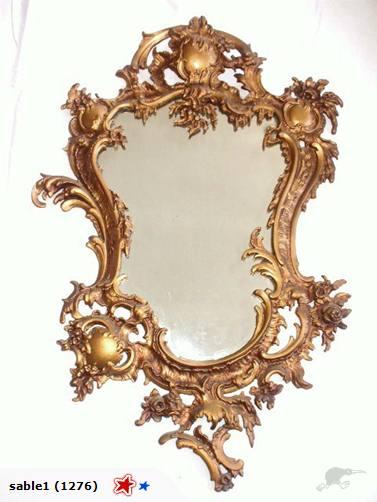 | ||||||||
| French Rococo Gold metal Mirror |
Here you are looking at an asymmetrical golden metal mirror
from the French Rococo era. I will be talking about the style, historical and
cultural aspects of this mirror and also how the mirror’s design is so natural.
The style of the Mirror is very unique because of its golden
frame on the mirror. The mirror has a lot of natural design on the frame with
flowers and roses surrounding the frame. This is because nature was one of the Rococo
themes and the beauty of nature was engaged into their art work. The historical
structure of the gilded mirror is characterized by lightness, elegance and
exuberant use of curves. Some of the features of the gilded mirror are its intricate
curving patterns and scrolls. The mirror frame has a soft/free flowing feeling
and has a massive natural feel, like a lot of the French Rococo
Architecture. In the 18th
Century they were into curves and asymmetrical forms. You can see this by the outrageous
amount of curves and how the designs are different on each side of the mirror. This
was the “it” thing during the French Rococo era. The word 'Rococo' is derived
from the French "Rocaille", a word used to describe the 18th Century
artistic or architectural style of decoration, characterized by elaborate
ornamentation with pebbles and shells. The
cultural context of this Gold Gilt Rococo mirror is that it was created in
France and now it’s ended up in New Zealand for sale.
To conclude, this mirror was a typical French rococo
item in the 18th century. Mainly because of the design of the frame
has a lot of natural themes and its elegance/exuberant use of curves is an
obvious hint.
1- 1650-1790: Rococo. (2012). In Rococo Architecture.
Retrieved April 25, 2012, from http://architecture.about.com/od/periodsstyles/ig/Historic-Styles/Rococo.htm
2-Rococo Gilt Gold Metal Mirror . Ed. Sam Morgan.
N.p., n.d. TradeMe. Web. 26 Apr. 2012.
<http://www.trademe.co.nz/antiques-collectables/art-deco-retro/home-d%C3%A9cor/mirrors/auction-468182457.htm>.
DSDN 142 Project two start.


Here is my start to project two. I have only played around with changing the X and Y variables. I think it was worth it doing this because it made me understand what would happen if I change "this in that". I have come out with some very interesting outcomes and my next goal is to understand how to use the random function and add it to my pattern. I'm hoping to achieve to put the random function into various squares to create noise and maybe even struture. But mainly noise!
Wednesday, 25 April 2012
DSDN 101- P2 Bounce idea
My first little movie of "bounce".
file:///G:/Victoria%20Uni/Flash%20project%20one,%20BOUNCE.html
Also my font I have used : http://www.dafont.com/bouncer.font?text=Bounce&psize=l
Monday, 2 April 2012
DSDN 142 - My first pattern (adding my code to pattern maker)
int xRepeat = 150;
int yRepeat = 150;
int x = 10;
int y = 10;
int w1 =40;
int a = 10;
int b = 10;
int bw = b+w1+b;
void setup() {
size(500, 500);
background(255);
for (int i = 0; i < width/xRepeat; i++) {
for (int j = 0; j < height/yRepeat; j++) {
pushMatrix();
translate(xRepeat*i, yRepeat*j);
myPattern();
popMatrix();
}
}
}
void myPattern() {
rect(x+a+w1,y+a+w1,bw,bw);
rect(x,y,a,a);
rect(x+a+w1+bw+w1,y,a,a);
rect(x,y+a+w1+bw+w1,a,a);
rect(x+a+w1+bw+w1,y+a+w1+bw+w1,a,a);
rect(x+a,y+a,w1,w1);
rect(x+a+w1+bw,y+a,w1,w1);
rect(x+a,y+a+w1+bw,w1,w1);
rect(x+a+w1+bw,y+a+w1+bw,w1,w1);
rect(x+a+w1+b,y+a,w1,w1);
rect(x+a,y+a+w1+b,w1,w1);
rect(x+a+w1+b,y+a+w1+bw,w1,w1);
rect(x+a+w1+bw,y+a+w1+b,w1,w1);
}
int yRepeat = 150;
int x = 10;
int y = 10;
int w1 =40;
int a = 10;
int b = 10;
int bw = b+w1+b;
void setup() {
size(500, 500);
background(255);
for (int i = 0; i < width/xRepeat; i++) {
for (int j = 0; j < height/yRepeat; j++) {
pushMatrix();
translate(xRepeat*i, yRepeat*j);
myPattern();
popMatrix();
}
}
}
void myPattern() {
rect(x+a+w1,y+a+w1,bw,bw);
rect(x,y,a,a);
rect(x+a+w1+bw+w1,y,a,a);
rect(x,y+a+w1+bw+w1,a,a);
rect(x+a+w1+bw+w1,y+a+w1+bw+w1,a,a);
rect(x+a,y+a,w1,w1);
rect(x+a+w1+bw,y+a,w1,w1);
rect(x+a,y+a+w1+bw,w1,w1);
rect(x+a+w1+bw,y+a+w1+bw,w1,w1);
rect(x+a+w1+b,y+a,w1,w1);
rect(x+a,y+a+w1+b,w1,w1);
rect(x+a+w1+b,y+a+w1+bw,w1,w1);
rect(x+a+w1+bw,y+a+w1+b,w1,w1);
}
Subscribe to:
Posts (Atom)